Electrify America
- 4.6
- Rating
- 500.00K
- Installs
- Free
- Price

 Analysis by App-foxy
When I use Electrify America, I am not really looking for another general-purpose map. I am looking for one answer at a stressful moment: where can I find a compatible public fast charger, and can I make a sensible plan around it? That focused job is what makes this Maps & Navigation app useful. It comes from Electrify America LLC, is free to use, and is aimed at drivers who need access to the company’s charging network rather than a broad collection of unrelated navigation tools.
My overall impression is positive, especially when I treat it as a charging companion instead of expecting it to replace every mapping app on my phone. The app has a 4.5 average from around 20 thousand ratings and more than 500 thousand installs, which suggests it has become a familiar tool for many electric-vehicle drivers. It is rated for Everyone, and the current version is 7.31.0, with support beginning at Android 8.0.
Finding a fast charger is the app’s real strength
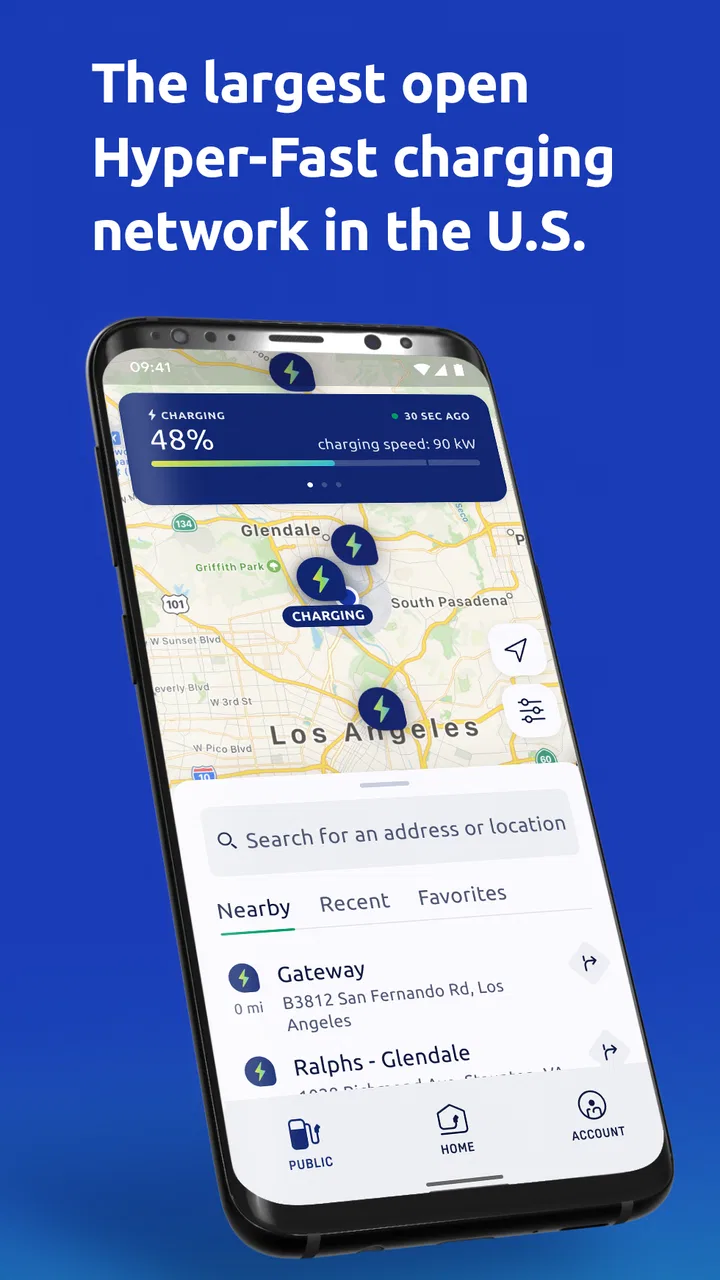
The central capability is straightforward: Electrify America helps me locate charging stations in its public fast-charging network. That sounds simple, but the practical value is considerable. A normal map can show places, roads, and businesses; this app keeps the charging stop at the center of the experience. I can begin with the question that matters to an EV driver: where is the next Electrify America station that fits my route and my immediate needs?
You May Also Like

 Blood Strike: 2.5 Anniversary
Blood Strike’s Loadouts Turn Every Drop Into a Tactical Gamble
A close look at Blood Strike’s custom loadouts: how fast access to signature weapons reshapes its battle royale rhythm, rewards preparation, and narrows the gap between fights.

 Pandora - Music & Podcasts
Pandora’s Music Is Easy to Start, but Harder to Recover
Pandora’s strength is its low-effort path from a seed to a station. Its weak spot is how much confidence it asks you to place in connection, setup, and quiet recovery.

 8 Ball Pool
 Is Built on Rivalries, Rematches, and Routine
A close look at the rivalries, rematches, shared routines, and unanswered safety questions that turn a quick pool match into a persistent mobile community.

 Samsung Music
’s Quiet Strength Is Playing What You Already Own
Its reach comes less from spectacle than from dependable access to a personal library. That simplicity is both the app’s strongest retention engine and its ceiling.

 AccuWeather: Weather Radar
AccuWeather Review: A Quick, Clear Forecast for Everyday Decisions
For everyday plans, the best forecast is the one you can understand quickly. AccuWeather makes rain timing, radar, and local conditions easy to act on, with a few trade-offs.

 Hill Climb Racing
Why Hill Climb Racing Still Turns Crashes Into One More Run
A tiny car, a bumpy hill and one more upgrade: Hill Climb Racing keeps resurfacing because its simple chaos makes every near-miss feel personal.
More From Our News Desk



The company describes its network as America’s largest public fast charging network, with over 500 charging stations. I do not read that as a promise that every journey will be covered perfectly. Instead, I see it as a reason to keep the app available when my route passes through areas served by Electrify America. The network focus gives the app a clear identity, and it avoids the clutter that often appears when a general map mixes public chargers, private facilities, dealerships, and destination charging.
That narrow purpose also makes the app easier to judge. If I want a broad view of every charging operator, I would rather use a service designed to aggregate multiple networks. If I want to check Electrify America locations directly, this app is more relevant. Its value is not that it replaces every navigation tool; its value is that it keeps one charging network easy to investigate.
I find this distinction important because charging decisions are different from ordinary route decisions. A restaurant or shop can be skipped without much consequence. A charging stop needs more thought. I may need the right connector, enough time to charge, a location that works with my route, and a backup plan if the first stop is inconvenient. An app built around charging lets me start that process with less searching.
What I check before leaving
My preferred workflow is to open the app before I set off, search along the direction of travel, and compare possible stops rather than waiting until the battery is low. I look at the station’s position in relation to the route, then consider whether the stop would leave me with a comfortable margin. That last part is personal: the app can help me find a station, but it cannot decide how much range I should reserve for traffic, weather, passengers, or an unexpected detour.
I also avoid treating the closest pin as automatically the best choice. The nearest station may require a turn that complicates the trip, while another location slightly farther away may fit naturally into a planned break. That is one of the less obvious advantages of using a dedicated charging app: it encourages me to think of charging as a planned stop rather than an emergency search.
For regular travel, I would keep a second navigation option available. Electrify America is most useful for the charging question, while a broader maps service may be better for live road conditions, complex urban directions, or combining several errands. Using both is not wasteful. It separates two jobs that are often confused: finding a suitable charger and navigating the entire journey.
How the station search feels in everyday use
In practice, I use the app in two stages. First, I inspect the available Electrify America locations before driving. Second, I return to it when I am close enough to make the stop decision. This two-stage habit is more reliable than opening any charging app only after a warning appears on the dashboard.
Before a longer drive, I would check the route at home, note a primary station, and identify another reasonable option farther along or near the same road. I would not assume that a map marker alone guarantees a smooth stop. A station can be inconvenient because of traffic, access roads, a busy parking area, or the amount of time I have available. The app helps me discover the location, but the final choice still requires ordinary judgment.
On a short local trip, the process is quicker. If I know I will need a fast charge, I can use the app to find a nearby Electrify America location instead of scanning a general map full of businesses and unrelated charging points. This is where the focused design feels most practical. I am not trying to learn the entire charging landscape; I am checking one network that I already intend to use.
One useful habit is to search before the battery becomes urgent. That gives me time to compare stations and change course without pressure. It also makes the app more valuable as a planning tool. When I wait until the last moment, every limitation of a charging map becomes more serious because I have fewer alternatives.
A realistic road-trip example
Imagine I am driving out of town for the day and know that the return trip may require a fast charge. I open Electrify America before leaving, look for a station that sits near the natural path of the journey, and choose a stop that does not force me to cross the whole city. I then keep the location in mind while using my regular navigation app for turn-by-turn driving.
As I approach the area, I check the charging app again rather than relying only on memory. If the station is still the most convenient option, I continue there. If traffic or a change in plans makes another location more sensible, I can reassess before the battery becomes critically low. This is a small workflow change, but it reduces the mental load of trying to solve the entire trip from the driver’s seat.
After charging, I can return to the app for the next part of the journey if another Electrify America stop is needed. I would still keep an eye on the car’s own range estimate, because the app is not a substitute for the vehicle’s battery information. The best result comes from combining the station search with the car’s range display and a general navigation tool.
Where it is especially useful
The app makes the most sense for drivers who regularly use Electrify America stations, particularly those who travel beyond their familiar neighborhood. It is also helpful for someone new to electric-vehicle road trips and still learning how to plan charging stops. A dedicated network app can make the first step feel less confusing because the search is not mixed with every possible charging provider.
I can also see its value for households with more than one driver. If one person normally handles charging research and another takes the car on a separate trip, having a direct way to inspect Electrify America locations makes the routine easier to share. The app is free, so keeping it installed does not require a purchase decision, and the Everyone rating makes it suitable for a wide household audience.
It is less compelling for someone who never uses this network or who wants one unified view of chargers from many providers. In that case, an independent charging aggregator may reduce app switching. I would also hesitate to make it my only travel tool if I depend heavily on detailed route planning, traffic avoidance, or multi-stop itinerary management.
The tradeoff of a network-specific app
The same focus that makes Electrify America clear also creates its main limitation. A network-specific app is naturally narrower than a general EV map. If my priority is to compare every nearby charger regardless of operator, I may need another service. That does not make this app poor; it simply means I should choose it for the task it handles best.
There is another practical tradeoff: a station appearing in an app does not remove the uncertainty of real-world charging. A location can be busy, access can be less convenient than expected, and my route may change. I do not want to arrive with no reserve simply because a station appeared close on the screen. The app supports planning, but it cannot replace a cautious range strategy.
I also prefer not to make a charging decision while actively driving. Searching, comparing, and adjusting a route are tasks I handle before departure or after pulling over. That is basic safety, but it matters here because the app’s usefulness depends on thoughtful choices rather than hurried tapping.
For drivers who want a single app to manage every part of ownership, this may feel incomplete. I would pair it with the vehicle’s built-in range information and a familiar navigation service. That combination may mean using more than one app, but it gives each tool a clearer role and is more dependable than asking one specialized app to do everything.
Small habits that improve the experience
My first tip is to plan with a reserve instead of selecting a station only because it is the closest result. A slightly less direct stop can be the better choice if it fits the route and leaves room for an unexpected change. This is especially important on unfamiliar roads, where a short-looking detour can take longer than expected.
My second tip is to save the app for decisions that benefit from its network focus. I do not open it for every ordinary trip. I use it when I need to identify an Electrify America stop, compare charging possibilities along a longer drive, or confirm where I can reasonably recharge before continuing. That keeps the app from becoming background clutter.
My third tip is to separate discovery from navigation. I use Electrify America to investigate the charging stop, then rely on the navigation tool I prefer for the actual road journey. This avoids forcing a charging-focused app into a role where a broader map may be more comfortable, while still preserving the app’s most useful advantage.
A fourth habit is to check the station before the battery becomes the main concern. If the first option is inconvenient, I have time to consider another location. If I wait until the range is very low, I lose flexibility. The app works best when it is part of a calm plan rather than a last-second rescue.
How it compares with familiar alternatives
Compared with a standard maps app, Electrify America is more focused on the charging network itself. A general map is usually better for businesses, road directions, and a complete view of the surrounding area. This app is better when I want to narrow my attention to Electrify America stations without sorting through unrelated map results.
Compared with a multi-network EV application, it offers less breadth but a more direct relationship with one operator’s locations. That can be an advantage for a driver who already knows which network they prefer. It can be a disadvantage for a road trip where the best stop might belong to another provider. My choice depends on whether network loyalty or maximum coverage matters more for the journey.
Compared with relying only on the car’s built-in system, the app gives me another place to examine Electrify America locations before I start driving. The vehicle display remains important for range and route context, but I like having a dedicated option for charging research. Neither tool needs to replace the other.
Who should install it
I would recommend Electrify America to an EV driver who uses this network often, plans public fast-charging stops, or wants a direct way to look for stations before a longer trip. It is also a sensible free download for someone who wants a dedicated backup to a general navigation app. The current release works on Android versions from 8.0 onward, so it is accessible to many older Android phones as well as newer devices.
I would suggest skipping it if you never use Electrify America stations, want a universal charger directory, or expect one app to provide the most complete driving experience from departure to arrival. In those cases, a broader EV aggregator or the car manufacturer’s own navigation system may suit you better. Installing this app only makes sense when its network focus matches the way you charge.
After using it as a planning companion, I see Electrify America as a practical specialist rather than an all-purpose travel solution. Its strongest effect is reducing the effort required to find a relevant fast-charging stop, especially before a trip or when I am outside my normal area. The app does not remove the need for range awareness, route judgment, or a backup plan, but it gives those decisions a clearer starting point.
For a free Maps & Navigation app from Electrify America LLC, that is a worthwhile role. I would keep it installed if I regularly depend on the network, use it before the battery becomes urgent, and pair it with a broader map for the rest of the journey. My recommendation is positive for network users, but conditional for everyone else: choose it for direct Electrify America planning, not as a replacement for every EV navigation tool.
Electrify America has been available since May 22, 2019, and its continued presence is easy to understand once I use it with the right expectations. It is a focused, free utility for locating and planning around the company’s public fast-charging stations. When that is the problem I need to solve, the app is genuinely useful; when the problem is broader than that, I reach for a different tool alongside it.
FAQs for Electrify America
01What is Electrify America and how does it work?
Electrify America is a mobile app designed to help electric vehicle (EV) drivers locate and use charging stations across the country. Users can search for nearby stations, check their availability, and even start a charging session directly from the app. It also provides updates on charging progress and allows for easy payment.
02Is the Electrify America app free to use?
Yes, the Electrify America app is free to download and use. However, while the app itself has no cost, users will need to pay for the actual charging services at the stations. The app offers various payment options, including credit cards and contactless payment methods.
03What features does the Electrify America app offer for EV drivers?
The app provides a range of features, including real-time location tracking of charging stations, station availability, charging speed information, and the ability to start and stop charging sessions. Additionally, users can set up notifications for charging status updates and view detailed charging history and receipts.
04Are there any specific device requirements to use Electrify America?
To use the Electrify America app, you need a smartphone running either Android or iOS. It requires a stable internet connection for optimal performance. Ensure your device is updated to the latest operating system version to avoid compatibility issues and access all features smoothly.
05How secure is my payment information on Electrify America?
Electrify America employs industry-standard security measures to protect your payment information. The app uses encryption to safeguard data during transactions. Additionally, users can manage their payment methods within the app and are advised to set up strong passwords for enhanced security.
Pros
- Wide network of charging stations.
- Fast charging speeds available.
- User-friendly app interface.
- Real-time station status updates.
- 24/7 customer support.
Cons
- Limited rural area coverage.
- Occasional app connectivity issues.
- Higher rates than some competitors.
- Inconsistent charger availability.
- No reservation system for spots.

Electrify America
Gallery